Shopify Withdrawal Button: How to Set It Up Correctly + What Changes in 2026
The EU withdrawal button applies from 19 June 2026. What § 356a BGB requires and how to set up button, withdrawal notice and checkout in Shopify.

In short
- Withdrawal button: From 19 June 2026, online shops selling to consumers in the EU need an electronic withdrawal function. A form hidden in the terms and conditions is not enough.
- New rules: Directive (EU) 2023/2673, implemented in Germany as § 356a BGB, requires a clearly labelled button, a confirmation step and an immediate acknowledgement of receipt.
- Withdrawal notice: The model withdrawal notice now has to tell customers about the button and where to find it.
- Digital products and subscriptions: Without the correct opt-in, the exclusion of the right of withdrawal for digital content does not apply. Subscriptions need clear information on term and cancellation.
- Shopify adjustments: Withdrawal button, checkout texts, confirmation emails and possibly checkout extensions need updating.
- Legal risk: Missing or incorrect withdrawal information is one of the most common grounds for legal warnings in German e-commerce.
Withdrawal information is one of the most common grounds for legal warnings in German e-commerce, and shop owners often underestimate it. Many shops have no withdrawal option outside their terms, label it incorrectly, or hide it so well that it does not count legally.
From 19 June 2026, a new requirement applies on top of that: Directive (EU) 2023/2673 adds an electronic withdrawal function for contracts concluded online. Germany implements it in § 356a BGB. If your Shopify shop is not adjusted yet, do it before a legal warning arrives.
What changes from 19 June 2026
The core change is the withdrawal function. If a consumer can conclude a contract through your online interface, they must also be able to withdraw through it.
Withdrawal button: The function must be clearly legible, prominently placed and easy to access during the entire withdrawal period. In Germany the button reads "Vertrag widerrufen" or an equivalent unambiguous wording. The directive's English wording is "withdraw from contract here".
Data entry: After clicking, the customer enters or confirms only their name, details identifying the contract (for example the order number) and an electronic contact for the acknowledgement. You may not ask for more, such as a reason for the withdrawal.
Confirmation step: The withdrawal is submitted with a second button labelled "Widerruf bestätigen" ("confirm withdrawal") or an equivalent unambiguous wording.
Acknowledgement: Without undue delay, you must send the customer an acknowledgement of receipt on a durable medium, such as an email. It contains the content of the withdrawal and the date and time it was received.
Withdrawal notice: The statutory model withdrawal notice has been updated. It now informs customers that they can withdraw online via the button and where to find it. Shops still using the old version are formally non-compliant, and incorrect withdrawal information can extend the withdrawal period from 14 days to 12 months and 14 days.
The button is an additional channel. Customers can still withdraw by email, letter or with the model withdrawal form.
The Shopify withdrawal button explained
The term "Shopify withdrawal button" usually refers to one of two things, and your shop needs both.
First: the withdrawal button for customers. This is the withdrawal function described above: a clearly labelled button that leads to a short form with a confirmation step. A hidden link in the footer or a PDF form inside the terms and conditions does not meet the new rule.
Second: the checkout button. In Germany, the so-called "button solution" applies (§ 312j para. 3 BGB): the order button must clearly state that the order involves a payment obligation, for example "Zahlungspflichtig bestellen" (order with obligation to pay) or "Jetzt kaufen" (buy now). Labels like "Continue", "Confirm" or "Submit" are not permitted. If the button is labelled incorrectly, no contract is formed.
Check what your Shopify checkout button says in German. You can change the wording under Settings > Languages, in the translations for the checkout.
The customer-facing withdrawal button has to be set up separately. In Shopify you can build it yourself with a dedicated page, a form and an automated confirmation email, or use an app such as EasyWiderruf (widerruf.app). Either way, check that it covers the confirmation step and the acknowledgement with date and time.
Updating your withdrawal notice
The withdrawal notice belongs in the terms and conditions, and customers must also find it easily during the ordering process.
The notice must be shown clearly before the contract is concluded. In Shopify this is usually handled in the checkout, either with text blocks or with a well-placed link at the point of order completion.
Many shop operators overlook that the order confirmation must also contain the full notice. A link to "withdrawal notice" without the actual text is not formally sufficient.
Replace the old text with the updated model notice that mentions the withdrawal button. Also check that it covers deadlines and exceptions correctly. For custom-made items, perishable goods and digital content in particular, the wording must be right.
Digital products and subscriptions
For digital products such as downloads, software licences, digital content or memberships, the right of withdrawal can expire once you have started performance. Two conditions must be met.
First, the customer must have expressly consented to performance starting immediately. Second, they must have confirmed that they know they lose their right of withdrawal as a result. Both must be requested actively. A pre-ticked checkbox is not sufficient.
You also need to be able to prove that consent was given, and when. In Shopify this means a consent checkbox in the checkout and a way to store the consent with the order. Shopify does not provide this out of the box.
For subscriptions, contract term, cancellation periods and the consequences of withdrawal must be stated clearly before purchase. A reference hidden in long terms and conditions is not enough.
Practical implementation in Shopify
Shopify can meet the legal requirements, though some defaults need adjusting. Check these areas:
Checkout button label: Under Settings > Languages, check the German checkout translations. "Zahlungspflichtig bestellen" or "Jetzt kaufen" are accepted wordings.
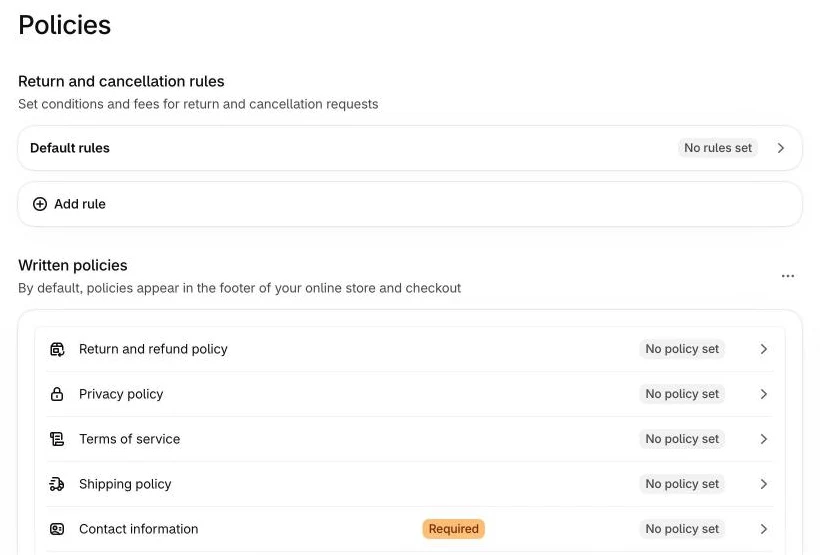
Checkout texts: In the checkout settings you can add text and notes. Use them to reference the right of withdrawal and link directly to the updated withdrawal notice.
Confirmation emails: The order confirmation must contain the complete withdrawal notice. You can add the text block in the Shopify notification templates. Check the other transactional emails too, such as shipping confirmation and invoice emails.
Withdrawal button and form: Put the button in the footer and the customer account, and link to it from the confirmation email. If you run a returns page, check that the button is embedded there correctly.
Digital products and checkboxes: If you sell digital content, you need an explicit consent checkbox in the checkout. Checkout UI extensions in the information, shipping and payment steps are only available on Shopify Plus. On other plans, check which options and apps are available for your plan. The old route via checkout.liquid and Shopify Scripts no longer exists.
Documentation and proof
In a dispute, you must be able to prove that a specific customer was informed correctly at a specific point in time.
Document which version of your withdrawal notice was active when. If you have changed the notice over time, archive earlier versions with the dates they were valid. This matters when a customer later claims an extended withdrawal period and you need to show that the correct version was live at the time of their purchase.
The same applies to the withdrawal button: keep the acknowledgements you send, with date and time of receipt.
Record changes to legally relevant pages (terms, withdrawal notice, privacy policy) with a date, for example in an internal changelog.
Legal warning risk
Incorrect withdrawal notices have been among the most common grounds for legal warnings in German e-commerce for years. The withdrawal button rule from 19 June 2026 adds a new point that is easy to check from the outside: is the button there, and is it labelled correctly?
Particularly at risk are shops without a withdrawal button, shops with an outdated withdrawal notice, shops selling digital products without the correct consent request and shops offering subscriptions without clear information at checkout.
Firms sending legal warnings do not need to review each case individually. Automated tools scan online shops for formal errors. A missing button or an outdated notice makes a shop vulnerable, regardless of how well the rest is set up.
Conclusion
The withdrawal button is a legal requirement for B2C shops in the EU from 19 June 2026. Starting now leaves you time to do it properly. Go through this list: Is there a clearly labelled withdrawal button with a confirmation step? Does the customer get an acknowledgement with date and time? Is the checkout button correctly labelled? Are the withdrawal notice, checkout texts and confirmation emails up to date?
Related Articles

Maik GossenShopify freelancer from Germany. I build, move and maintain Shopify stores and developed the EasyWiderruf app.